




Overexposed or underexposed photo: causes and how to fix it
Understanding an overexposed or underexposed photo: causes at the time of shooting, exposure correction, histogram, editing, and diagnosis in film and instant photography.
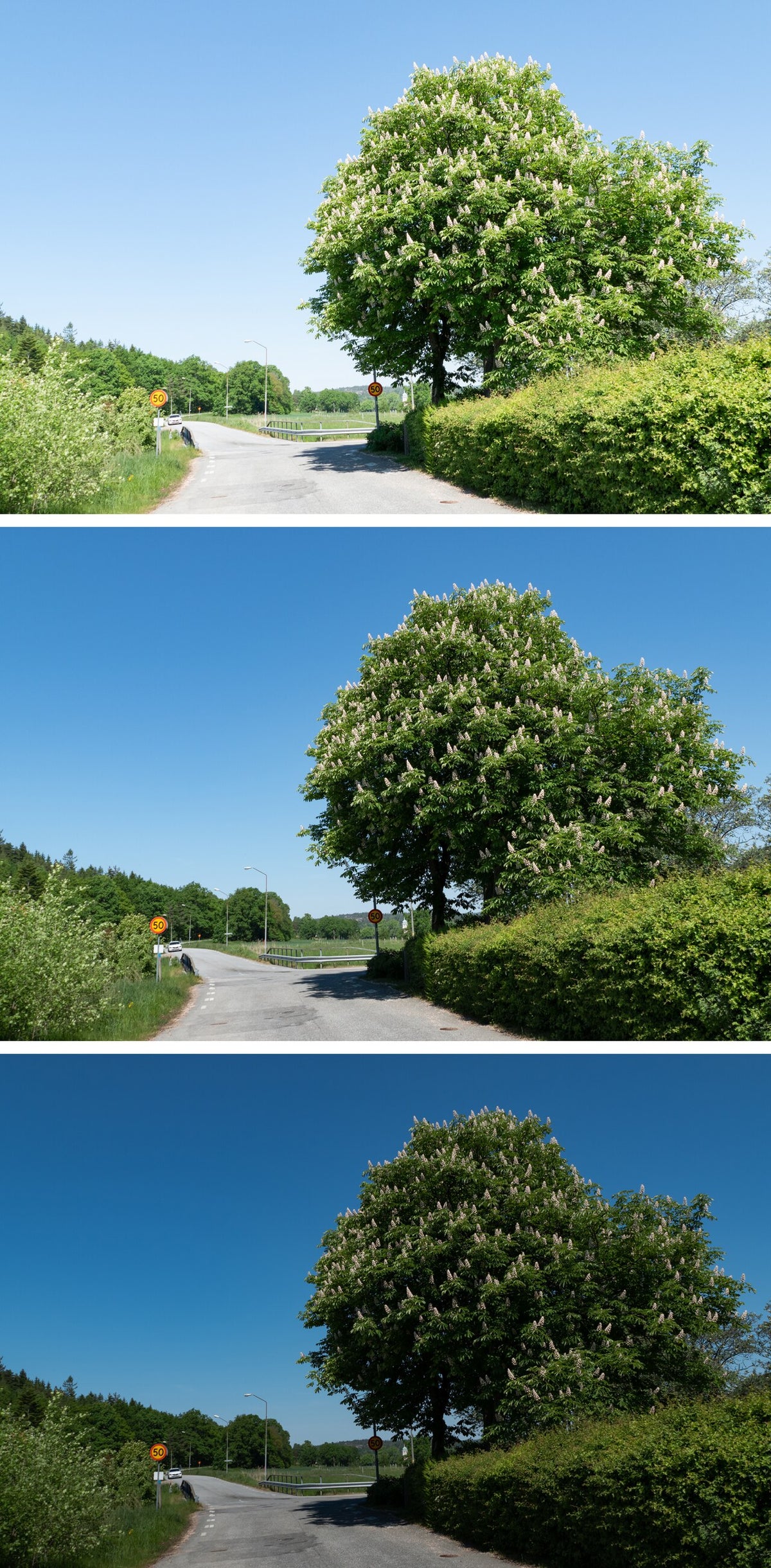
An overexposed photo is too bright ("blown-out" whites, no detail), while an underexposed photo is too dark (crushed shadows). The causes are almost always the same: the meter is fooled by a very bright or very dark scene, the flash is too close or too far away, or a manual setting was forgotten. You can correct this while shooting with exposure compensation and the histogram; in post-processing, slight underexposure is easier to fix than overexposure.

Common causes
| Situation | Result | Correction |
|---|---|---|
| Snow, beach, clear sky | Underexposed (gray) | Correction +1 to +2 |
| Backlighting | Subject too dark | +1 to +2 or fill flash |
| Bright subject on a black background (scene, Moon) | Overexposed | Correction −1 to −2, or spot metering |
| Flash too close | White face | Step back one meter |
| Flash too far away | Everything dark | Move closer (2 to 3 m maximum) |
| Manual mode or ISO forgotten | All photos off | Switch back to automatic, check the ISO |
How metering works is explained in shooting modes and metering, and the relationship between aperture, shutter speed, and ISO in the exposure triangle. For special cases: backlighting, snow and fog, flash.
Using the histogram
The histogram shows the distribution of tones: pinned to the right, the whites are blown out; pinned to the left, the shadows are crushed. Many cameras also display blown-out areas flashing during playback. Correct it, then retake the photo.
Correcting in post-processing
- Underexposure: boost the exposure or shadows; it works well for one or two stops, with a bit more noise.
- Overexposure: lower the highlights; a completely white area no longer contains any information.
- The RAW file leaves more room than JPEG (RAW or JPEG).
- Free tools: free photo editing software.
Film photography
The color negative handles overexposure well and underexposure poorly: a very transparent negative produces gray and grainy scans. The slide is the opposite: it requires precise exposure. If an entire roll is too bright, consider an incorrectly set sensitivity, a slow-closing lens diaphragm (greasy blades), or a shutter that is too slow; if it is too dark, a weak battery for the meter or a bad ISO setting. See meter and light meter, pushing film, and slides.
Instant photography
An Instax or Polaroid photo that is too bright or too dark is often due to light (backlighting, subject out of flash range) or temperature. The Polaroid light/dark slider and full diagnosis are in failed instant photos.
Frequently asked questions
How to correct an overexposed photo?
In post-processing, lower the exposure and highlights. Completely white areas cannot be recovered; while shooting, use negative exposure compensation.
Why are all my photos too dark?
Check the exposure compensation (still set to a negative value?), the ISO, the manual mode, and whether the flash is turned off indoors.
Is it better to overexpose or underexpose?
In digital photography, it is better to underexpose slightly to preserve the highlights. With film negatives, it is better to overexpose slightly.
All cameras sold on Vibes Photo are checked before shipping and covered by a 6-month warranty (details in our general terms and conditions of sale).
View our film cameras → View the vintage digital essentials →