




Color filters for black and white: yellow, orange, red, green
How color filters turn grays into black and white, which one to choose, and by how much to adjust the exposure.
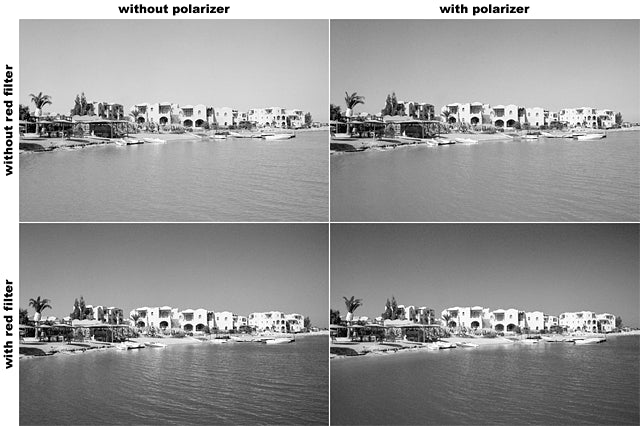
In black and white, a blue sky can come out completely gray, almost white. Photographers have had a solution for a century: a color filter in front of the lens. Yellow, orange, red, green: each changes the way colors become shades of gray. Here is how they work, which one to choose, and how much to correct the exposure, according to Kodak data.
The principle: lighten its color, darken its complement
A color filter lets its own color through and blocks others, especially its complementary color. On black-and-white film, it therefore lightens objects of its color and darkens others. Example: a yellow filter, or more strongly an orange or red one, darkens the blue sky while leaving the white clouds. The contrast between sky and clouds increases.

Which filter for which effect?
| Filter (Wratten) | Effect | Use |
|---|---|---|
| Yellow (no. 8) | Slightly darkens the sky, makes clouds stand out | The "leave-on" filter for landscape lenses |
| Dark yellow (no. 15) | Enhanced yellow effect | Landscape, architecture |
| Orange | Darker sky, stronger contrast | Landscape, architecture |
| Red (no. 25) | Very dark sky, almost black; dramatic effect | Spectacular landscape |
| Yellow-green (no. 11) / green (no. 58) | Darkens the sky, lightens foliage | Nature, outdoor portraits |
| Blue (no. 47) | Lightens blue, darkens red and green | "Old film" orthochromatic effect |
According to Wikipedia, light yellow-green filters were the classic portrait filter for panchromatic films. The polarizer, meanwhile, is colorless: it reduces reflections and darkens the sky, in both color and black and white. For filters in general (UV, ND, polarizer): the photo filter guide.
The filter factor: correcting the exposure
A color filter absorbs light: you need to compensate. The filter factor indicates by how much to multiply the exposure. Here are the factors published by Kodak for Tri-X 400, in daylight:
| Kodak Wratten Filter | Factor (day) | Approximate correction |
|---|---|---|
| No. 8 (yellow) | 2 | +1 stop |
| No. 15 (dark yellow) | 2.5 | +1⅓ stops |
| No. 11 (yellow-green) | 4 | +2 stops |
| No. 58 (green) | 6 | +2⅔ stops |
| No. 47 (blue) | 6 | +2⅔ stops |
| No. 25 (red) | 8 | +3 stops |
| Polarizer | 2.5 | +1⅓ stops |
These factors vary depending on the film and the light (Kodak gives other values in tungsten light). And the Wratten numbers are not a universal standard: two filters of the same number can differ from one manufacturer to another.
With a TTL metering camera
If your camera measures light through the lens, the cell already "sees" the filter. Kodak indicates not to change the sensitivity setting in this case. With an external cell or a camera whose cell is outside the lens (many rangefinders and compacts), apply the correction yourself. See cell and light meter.
Choosing your filters properly
- Check the thread diameter of your lens (indicated on the front ring, for example 49, 52 or 55 mm).
- Start with a yellow: the effect is subtle and the light loss limited.
- Add a red or an orange for graphic landscapes.
- Use a lens hood to limit stray reflections: see lens hood and UV filter.
- Do not use them in color: they would give a cast over the entire image.
On the film side: Tri-X or HP5 are very suitable. See which black and white film to choose, our review of the Kodak Tri-X 400 and our review of the Ilford HP5 Plus.
Frequently asked questions
Which filter to use in black and white?
A yellow filter to start: it slightly darkens the sky and makes clouds stand out. Orange and red reinforce the effect.
Why put a red filter on black and white?
To greatly darken the blue sky and make clouds stand out, for a dramatic effect.
How much to correct the exposure with a red filter?
Kodak gives a factor of 8 in daylight for no. 25 with Tri-X 400, which is about +3 stops.
Should you correct the exposure with a DSLR?
No if your DSLR measures through the lens (TTL): the cell already takes the filter into account.
Sources: Kodak – Tri-X 400, data sheet (filter factors) ; Wikipedia – Photographic filter ; Kodak – Ultra Max 400, data sheet (TTL metering).