




DX code: how your camera reads the film's sensitivity
The DX code explained: the three codes, how the camera reads them, compact cameras that only read ISO 100 and 400, and film without codes.
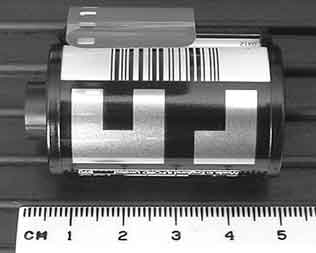
On a 35 mm film cartridge, you have probably noticed a metallic grey checkerboard. This is the DX code. It allows your camera to know the film's sensitivity without you having to set anything. Here is how it works, which cameras read it, and what to do with film without a code or that you want to push.
The three DX codes
| Code | Where | What it is used for |
|---|---|---|
| CAS code (checkerboard) | On the metallic side of the cartridge | Read by the camera: sensitivity, number of exposures, latitude |
| Cartridge barcode | Near the film exit | Read by lab machines: manufacturer, film type, process |
| Film edge barcode | Under the perforations, visible after development | Film and frame identification for printing and scanning |

How the camera reads the checkerboard
The checkerboard consists of two rows of six squares. Each square is either bare metal (conductive) or painted (insulating). In the cartridge slot, electrical contacts touch these squares and read the pattern. Part of the squares code the sensitivity: 24 values from 25 to 5000 ISO, by f-stop. The others code the number of exposures (12, 20, 24, or 36) and the exposure latitude.

Not all cameras read everything
Many consumer cameras only read part of the squares, enough to distinguish common sensitivities (100, 200, 400, 800). Others even less:
| Camera | DX reading | Film without DX code |
|---|---|---|
| Minolta Riva AF 35 | Two values: less than 400 ISO exposed at 100, 400 and more exposed at 400 | Exposed at 100 ISO |
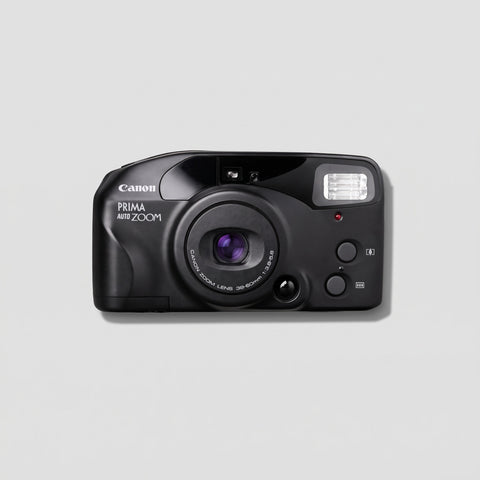
| Canon Prima Mini (Sure Shot M) | 25 to 3200 ISO by full f-stop | Exposed at 25 ISO |
| Pentax Espio Mini | 25 to 3200 ISO | Exposed at 25 ISO |
| Olympus Mju II | 50 to 3200 ISO (DX-coded film) | Not specified by the sheet |
| Canon EOS 300 | DX auto or manual setting from 6 to 6400 ISO | Manual setting possible |
Check your camera's manual: it indicates what happens with an uncoded film. The first compacts to read DX came out in 1984, the first SLRs in 1985 (including the Minolta 7000). Older cameras do not have DX reading: you set the sensitivity by hand.
Special cases
Film without DX code
Some bulk film, hand-reloaded or from small brands, does not have a DX code. On a camera that does not allow manual setting, the film will be exposed at the default value (often 100 or 25 ISO). With a color negative or tolerant black and white, overexposure often passes; with a slide, much less so.
Pushing a film
To push an HP5 to 1600 ISO, you must be able to set the sensitivity by hand: this is possible on most SLRs, rarely on compacts. See pushing a film.
Barcode and scanning
The barcode on the film edge, invisible before development, is used by printing machines and certain scanning software to identify the film and apply a suitable color correction.

And in 120?
120 film does not have a DX code. Fujifilm introduced a barcode for 120 in 1998, read by a few recent medium format cameras (Fujifilm GA645i, Hasselblad H1...). On most 120 cameras, you set the sensitivity yourself.
To go further: automatic film cameras, 200 or 400 ISO and choosing your film.
Frequently asked questions
What is the DX code on a film?
A checkerboard of metal and painted squares on the cartridge, which the camera reads with electrical contacts to know the sensitivity, the number of exposures and the latitude of the film.
What happens with a film without a DX code?
The camera applies a default sensitivity, often 100 or 25 ISO depending on the model, unless you can set it by hand.
Does my old camera read the DX code?
No if it dates from before the mid-1980s: DX reading appeared on compacts in 1984 and on SLRs in 1985.
Can you trick the DX code?
On a camera without manual setting, the reading is automatic. On an SLR, you just need to set the sensitivity by hand.
Sources: Wikipedia – DX encoding ; Camera-wiki – Minolta Riva AF 35 ; Camera-wiki – Canon Prima Mini ; Camera-wiki – Olympus mju II ; Camera-wiki – Pentax Espio Mini ; Camera-wiki – Canon EOS 300.