




Battery leaked in a camera: how to clean it
What to do when a battery has leaked in a camera, flash, or camcorder: remove it, neutralize the corrosion, clean the contacts, and know when to call a repair technician.
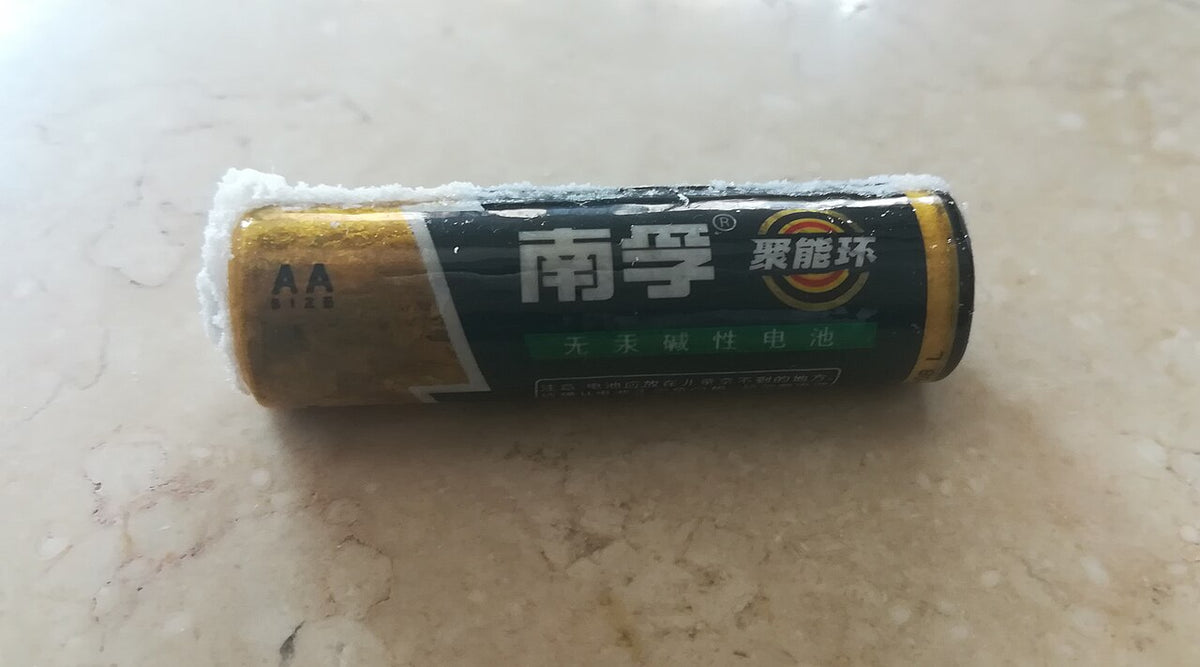
If an alkaline battery has leaked in your device, remove it using gloves, then clean the contacts with a cotton swab slightly moistened with white vinegar (or lemon juice) to neutralize the alkaline residue. Finish with isopropyl alcohol, let it dry, then gently scrape off any remaining oxidation. If the device turns on afterwards, you're in luck. If it doesn't respond, the corrosion may have traveled up the wires: that's a job for a repair professional.
The verdict in 30 seconds
Often salvageable
- residue limited to the battery compartment;
- contacts tarnished or slightly green;
- device turns back on after cleaning.
Bad sign
- green residue on the wires or inside the casing;
- contact broken or corroded through;
- nothing works despite clean contacts.

Why batteries leak
Alkaline batteries contain an electrolyte based on potassium hydroxide, a corrosive alkaline substance. Over time, especially when a battery is depleted and left in a device, internal pressure can cause this electrolyte to leak out. When it comes into contact with air, it forms white crystals and attacks the metal contacts, which become covered in green or black oxidation. NiMH and NiCd rechargeable batteries can also leak. Button cells (LR44, SR44) can too, although in smaller quantities.
What you'll need
- disposable gloves and safety glasses (the residue irritates the skin and eyes);
- cotton swabs and small pieces of absorbent paper;
- white vinegar or lemon juice;
- isopropyl alcohol (available at pharmacies or electronics stores);
- pencil eraser, fiberglass pen, or small toothbrush for scraping;
- optionally, an electronic contact cleaner.
Step-by-step method
- Remove the batteries using gloves. If they are stuck, gently pry them out with a wooden or plastic object, not a screwdriver, which could damage the contacts.
- Remove the dry crystals with a dry cotton swab or small brush, holding the device facing down so they don't fall into the casing.
- Neutralize: use a cotton swab barely moistened with white vinegar on the contacts and affected areas. It may foam slightly. Do not pour anything: the liquid must not run into the device.
- Rinse and dry: use a cotton swab moistened with isopropyl alcohol to remove the vinegar and moisture. Let it dry for at least an hour with the compartment open.
- Scrape off the oxidation with an eraser, fiberglass pen, or brush until the metal is shiny again. Blow away any residue.
- Test with new batteries. If the connection is poor, slightly straightening a spring may help, without forcing it.

When that's not enough
The electrolyte can travel up the wires connecting the battery compartment to the circuit. If you see green on these wires, if the device still won't turn on, or if a contact is corroded through, you'll need to open the device, clean the circuit, and sometimes replace the wires or contacts. On an inexpensive device, this repair often costs more than the device is worth. On a sought-after model, it's worth it.
Special cases
- Film camera with a button cell for the light meter: a small leak may be enough to disable the light meter. After cleaning, check the light meter with a new battery. Our guide to film camera batteries provides the references.
- Flash: a flash contains a capacitor that may retain a charge. Clean only the battery compartment and never open the casing.
- Swollen or deformed lithium-ion battery: do not puncture it, do not recharge it, and take it to a collection point.
How to prevent it
- Always remove the batteries from a device you plan to store for more than a few weeks.
- Do not mix new and used batteries, or batteries from different brands.
- Check the battery compartments of your stored devices once or twice a year.
- Store in a cool, dry place.
Before buying a used battery-powered device, ask for a photo of the open battery compartment. For general maintenance, read our article on maintaining a vintage camera.
All devices sold on Vibes Photo are inspected before shipping and covered by a 6-month warranty (details in our general terms and conditions of sale).